How a Medical Alert System Works
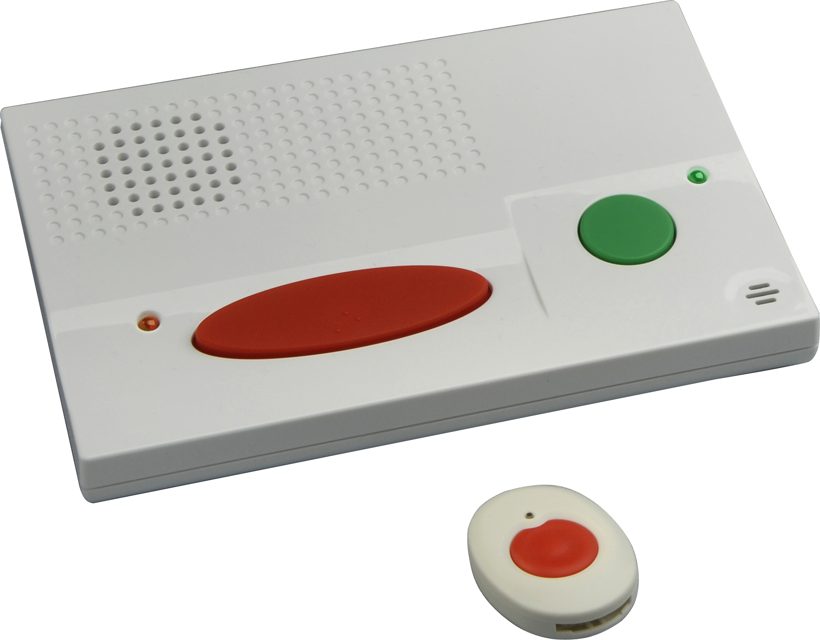
A medical alert system — also called a personal emergency response system, or PERS — is a simple idea: press a button and a real human answers, 24/7, ready to help. When your parent pushes the help button on their pendant, watch, or wristband, the device connects them through a base unit (for at-home systems) or over a cellular network (for mobile ones) to a monitoring center staffed around the clock by trained operators. The operator talks to them through the device's built-in speaker, assesses the situation, and can call a family member, a neighbor, or 911 — whichever is needed.
Most systems are built for "aging in place," the goal of helping seniors (and anyone with a health or mobility concern) live independently in their own home longer. The core hardwares are a small wearable button and either a landline-or-cellular base unit (in-home coverage up to roughly 1,000–1,400 feet in most brands) or a cellular GPS device worn on the go. Newer options also come as smartwatch-style devices with activity tracking and voice calls.
The business model is worth understanding up front because it drives everything below: you don't buy most medical alert devices outright. You pay a monthly monitoring fee that includes the equipment lease, the 24/7 call center, and usually no-contract or short-contract terms. That monthly fee is where the real cost — and the fine print — lives.
The Real Cost: the #1 Hidden-Fee Trap
Here's the single most important thing to understand before you shop: the advertised base price is almost never the bill your parent will pay. Most systems start around $25–35 a month for the base service, but that base price almost always excludes the feature senior shoppers want most — automatic fall detection.
Fall detection is a paid add-on ($5–15 a month), and it's NOT included in the base monthly price. This is the classic medical-alert marketing trick: the eye-catching headline is the cheapest possible plan, and the features that actually matter for safety (fall detection, GPS on mobile units, caregiver app access) are sold as extras that quietly raise the total. The minor extras — shipping, activation fees, a lost-device fee, or a long contract with early-termination fees — can hide in "call for details" pricing that the company won't post until you've already invested time.
So when you compare, don't compare the headline numbers. Calculate the full monthly total for the configuration you'd actually want — base plan + fall detection (+ GPS/caregiver app if you want it) — and ask every company, in writing, three questions: Is there an activation or equipment fee? Is it a contract, and what's the penalty to cancel? What's the price AFTER any introductory discount ends? Those three answers separate an honest plan from a trap.
| Brand | Base monthly range (2026) | Fall detection add-on | Notes |
|---|---|---|---|
| Bay Alarm Medical | ~$27.95 (landline) / ~$34.95+ | ~$10 (est.) | Value pick; strong BBB (A+); cellular options |
| MobileHelp | ~$25.95+ | ~$10 | Best value; accurate fall detection in testing |
| Medical Guardian | ~$31.95–46.95 | +$10 | Fastest response, best caregiver app (per testing) |
| LifeFone | ~$29.95+ (at-home) | +$5 | Cheapest fall add-on; couple-friendly; fastest NCOA avg response (~22s) |
| Lively Mobile2 | ~$24.99 (+ device ~$79.99) | included options | Smartwatch-style mobile option |
Prices are research snapshots from 2026 and change; always confirm the full monthly total (base + every add-on you want) on each brand's official site before deciding. Watch for "quote by call" transparency tricks — if a company won't post numbers, that itself is a red flag.
Fall Detection: the Marketing Hot-Button, Honestly
Fall detection is the feature senior marketers shout the loudest about — and the one that needs the most honest framing. In independent testing, the better systems catch the vast majority of hard, sudden falls: a clean drop-and-impact onto the floor, the kind that breaks a hip or causes a head injury. Devices do this with sensors (often an accelerometer) that detect the impact pattern of a fall.
But the honest caveat matters more: fall detection is not perfect, and it's not designed to catch every kind of fall. Soft, slow, or seated falls (sliding off a chair) and falls where the person drops gently onto a couch or thick carpet can be missed. It can also produce false alarms — a device might trigger on a hard knock or a vigorous motion and call in help nobody asked for. Every responsible brand ships a short cancellation window (typically 15–30 seconds) so the person can press a button or wave to tell the operator "I'm fine, false alarm."
Because of this, responsible reviewers — from the National Council on Aging to Consumer Reports — are explicit: no company can honestly guarantee fall detection catches every fall, and any vendor who claims it does is a red flag. NCOA's 2026 testing, for example, found the top brands detected 3 of 3 test falls, while a mid-tier option caught fewer; AARP's independent lab testing of MobileHelp detected 10 of 12 falls on one device and 12 of 12 on another. The takeaway: fall detection is a highly useful safety net worth paying for, but it's a helper, not a guarantee — and it should never be sold as one. If your parent has already fallen once, or has mobility challenges, this add-on is worth the $5–15/month.
In-Home vs. Mobile/GPS: Which Coverage Type?
This is the fork that decides most purchases, and it comes down to one question: does your parent spend their days mostly at home, or are they out and about?
In-home systems use a base unit connected by landline or cellular service. They cover the home (and some yard) — up to roughly 1,000–1,400 feet depending on the brand — and are the lower-cost, simpler choice. They're ideal for someone who's home most of the time, lives alone, or has limited mobility. The trade-off: outside that home radius, the help button is just a button.
Mobile/GPS systems work anywhere there's a cellular signal (typically AT&T or Verizon networks). The person wears a cellular pendant or smartwatch with built-in GPS that includes out-of-home location. This is right for an active senior who drives, walks the neighborhood, or travels. The honest trade-offs: higher monthly cost, and battery life is far shorter (typically 5–10 days between charges vs. months for a simple in-home button) — and if the device dies or they forget to charge it, it's silent. GPS location is also a helpful-but-not-perfect tool, not a live tracker.
A smaller but real consideration: the shower. Many current pendants are waterproof (IP67), which matters because the bathroom is a common fall location — a waterproof help button that you can wear in the shower is a genuinely valuable feature worth asking about.
The Caregiver App: Peace of Mind for the Family
Here's where this category quietly matters most to you, the adult child doing the research. The best systems ship a caregiver companion app — and that's often the feature that actually sells the device, because it's the one the family uses daily.
With a caregiver app (Medical Guardian's MyGuardian is the strongest example, and most major brands offer their own), you get real-time GPS location of your parent's device, a live map when help is pressed, fall alerts pushed straight to your phone, and sometimes the ability to see battery levels and check in. Some providers (like LifeFone) add scheduled daily check-ins, where the monitoring center confirms your loved one is okay on a set routine — a quiet, low-drama safety net rather than a constant surveillance feed.
The emotional driver here matters, and it's honest: this isn't about spying on a parent. It's the difference between worrying every time the phone doesn't ring and having a reliable "all clear." Framed well, these systems are an independence technology — the thing that lets a senior keep living on their own terms — rather than a tether. Leading geriatric-care guidance (including AARP, which has tested these extensively) suggests letting the older adult choose the brand, color, and style of their own device, because a device they'll actually wear is the one that protects them.
Reputation, Testing & Response Speed
Because a medical alert is only as good as the person who picks up, independent testing is the most trustworthy signal — and the good news is that this category is unusually well-tested by neutral organizations. The National Council on Aging (NCOA) tests response times and fall detection annually; its 2026 round saw LifeFone post the fastest average response (~22 seconds), with Medical Guardian, Bay Alarm, and MobileHelp all performing strongly on accuracy. Consumer Reports surveys real members on the big brands (Bay Alarm Medical, Lively, Life Alert, Medical Guardian, MobileHelp, Philips Lifeline) and consistently flags how few users realize what their monthly fee actually covers — the exact hidden-fee problem we covered above.
Two things to look for when judging any brand: UL-listed monitoring centers (an independent safety certification of the facility that answers the calls) and instant, posted pricing. Companies that publish clear numbers and certification details are generally the ones confident enough about their product to be transparent. Companies that won't post a price, push a hard-sell "quote by call," or pressure an immediate sign-up are, at minimum, wasting your time — and in the worst cases, running the kind of operation detailed in the section below.
Watch independent reviewers test these systems: the National Council on Aging's top-five comparison, and The Senior List's hands-on Lifeline review.
How to Choose: a Decision Map
Every family is different, but the choice usually collapses to a few patterns. Use these as a starting point — then confirm the full monthly total and ask the three fine-print questions from the cost section above.
a lower-cost in-home system. Bay Alarm Medical is the value pick; it pairs strong ratings with competitive pricing.
Medical Guardian leads on response time and the family app experience, ideal when the adult child wants active alerts.
a mobile/GPS device. MobileHelp (best value) or Lively's Mobile2 smartwatch-style unit covers them outside the home.
LifeFone lets a couple share one plan with two help buttons at little/no extra monthly cost — the cheapest way to cover two people.
honestly, the Apple Watch's built-in fall detection + direct 911 calling is a legitimate alternative worth weighing. It's not a classic medical alert (no dedicated monitoring center operator), so weigh that trade-off against its cost and convenience.
Avoid the Medical Alert Scam
We're ending on the uncomfortable but necessary note, because this category has a genuine scam problem — and honestly covering it is what makes this guide trustworthy. State attorneys general (including Minnesota's) and the FTC have both gone after medical-alert companies using predatory tactics: cold callers promising "free" systems under a Medicare angle, pressure to give a Social Security number or bank account over the phone, and spoofed caller ID to make an unknown call look legitimate. The FTC has fined companies in this space millions for threat-based sales tactics (the Instant Response Systems case, a $3.4 million penalty, is the well-known example).
Legitimate red flags to trust your instincts on: anyone who calls you uninvited to sell a medical alert; any "free" or "$0" promise (real monitoring costs money, and "free" is the bait); anyone asking for sensitive bank or ID information over the phone; and any high-pressure "act now" urgency. The legitimate, safe path is the reverse: you research the brand, you go to the official website, you choose the plan, and the company answers your questions — not the other way around. If it ever feels like a hard sell, walk away. That's the entire game.
For the businesses and families right here on the Jersey Shore — Cape May, Ocean City, Marmora, and the rest of South Jersey — a medical alert is one of those quiet products that helps aging-in-place families stay independent a whole lot longer. Our goal with this guide is simply to make the choice honest and easier, so you can focus on the peace of mind instead of the fine print.
Quick Quiz: Which Type Fits Your Parent?
Your Top Picks — Official Sites
These are the strongest, best-tested options from the comparison above. Visit their official sites to check current pricing and full plan details (authenticate the URL is the real brand site before entering anything).
Fastest response + best caregiver app
Medical Guardian — official siteBest value with accurate fall detection
MobileHelp — official siteAs tracked affiliate links become available for these programs, we'll swap them in here. For now these plain links take you straight to the brands' official sites so you can verify live pricing and terms yourself.
FAQ
Sources & Further Reading
- National Council on Aging — Best Medical Alert Systems with Fall Detection (2026)
- Wirecutter — The Best Medical Alert Systems
- Consumer Reports — Best Medical Alert Systems (member survey)
- AARP — Best Medical Alert Systems (tested & reviewed)
- The Senior List — The Best Medical Alert Systems (2026)
- Best Resources Online — Affiliate Disclosure